Rabu, 12 Februari 2014

DNS (IT)


Definition: The DNS translates Internet domain and host names to IP addresses. DNS automatically converts the names we type in our Web browser address bar to the IP addresses of Web servers hosting those sites.

DNS implements a distributed database to store this name and address information for all public hosts on the Internet. DNS assumes IP addresses do not change (are statically assigned rather than dynamically assigned).

The DNS database resides on a hierarchy of special database servers. When clients like Web browsers issue requests involving Internet host names, a piece of software called the DNS resolver(usually built into the network operating system) first contacts a DNS server to determine the server's IP address. If the DNS server does not contain the needed mapping, it will in turn forward the request to a different DNS server at the next higher level in the hierarchy. After potentially several forwarding and delegation messages are sent within the DNS hierarchy, the IP address for the given host eventually arrives at the resolver, that in turn completes the request over Internet Protocol.

DNS additionally includes support for cachingrequests and for redundancy. Most network operating systems support configuration of primary, secondary, and tertiary DNS servers, each of which can service initial requests from clients. Internet Service Providers (ISPs) maintain their own DNS servers and use DHCP to automatically configure clients, relieving most home users of the burden of DNS configuration.

WAN technology (IT)


What Is a WAN?

A WAN is a data communications network that covers a relatively broad geographic area and that often uses transmission facilities provided by common carriers, such as telephone companies. WAN technologies generally function at the lower three layers of the OSI reference model: the physical layer, the data link layer, and the network layer. Figure: WAN Technologies Operate at the Lowest Levels of the OSI Model illustrates the relationship between the common WAN technologies and the OSI model.
Figure: WAN Technologies Operate at the Lowest Levels of the OSI Model


Point-to-Point Links

A point-to-point link provides a single, pre-established WAN communications path from the customer premises through a carrier network, such as a telephone company, to a remote network. Point-to-point lines are usually leased from a carrier and thus are often called leased lines. For a point-to-point line, the carrier allocates pairs of wire and facility hardware to your line only. These circuits are generally priced based on bandwidth required and distance between the two connected points. Point-to-point links are generally more expensive than shared services such as Frame Relay. Figure: A Typical Point-to-Point Link Operates Through a WAN to a Remote Network illustrates a typical point-to-point link through a WAN.
Figure: A Typical Point-to-Point Link Operates Through a WAN to a Remote Network


Circuit Switching

Switched circuits allow data connections that can be initiated when needed and terminated when communication is complete. This works much like a normal telephone line works for voice communication. Integrated Services Digital Network (ISDN) is a good example of circuit switching. When a router has data for a remote site, the switched circuit is initiated with the circuit number of the remote network. In the case of ISDN circuits, the device actually places a call to the telephone number of the remote ISDN circuit. When the two networks are connected and authenticated, they can transfer data. When the data transmission is complete, the call can be terminated. Figure: A Circuit-Switched WAN Undergoes a Process Similar to That Used for a Telephone Call illustrates an example of this type of circuit.
Figure: A Circuit-Switched WAN Undergoes a Process Similar to That Used for a Telephone Call


Packet Switching

Packet switching is a WAN technology in which users share common carrier resources. Because this allows the carrier to make more efficient use of its infrastructure, the cost to the customer is generally much better than with point-to-point lines. In a packet switching setup, networks have connections into the carrier's network, and many customers share the carrier's network. The carrier can then create virtual circuits between customers' sites by which packets of data are delivered from one to the other through the network. The section of the carrier's network that is shared is often referred to as a cloud.

Some examples of packet-switching networks include Asynchronous Transfer Mode (ATM), Frame Relay, Switched Multimegabit Data Services (SMDS), and X.25.Figure: Packet Switching Transfers Packets Across a Carrier Network shows an example packet-switched circuit.

The virtual connections between customer sites are often referred to as a virtual circuit.
Figure: Packet Switching Transfers Packets Across a Carrier Network


WAN Virtual Circuits

A virtual circuit is a logical circuit created within a shared network between two network devices. Two types of virtual circuits exist: switched virtual circuits (SVCs) and permanent virtual circuits (PVCs).

SVCs are virtual circuits that are dynamically established on demand and terminated when transmission is complete. Communication over an SVC consists of three phases: circuit establishment, data transfer, and circuit termination. The establishment phase involves creating the virtual circuit between the source and destination devices. Data transfer involves transmitting data between the devices over the virtual circuit, and the circuit termination phase involves tearing down the virtual circuit between the source and destination devices. SVCs are used in situations in which data transmission between devices is sporadic, largely because SVCs increase bandwidth used due to the circuit establishment and termination phases, but they decrease the cost associated with constant virtual circuit availability.

PVC is a permanently established virtual circuit that consists of one mode: data transfer. PVCs are used in situations in which data transfer between devices is constant. PVCs decrease the bandwidth use associated with the establishment and termination of virtual circuits, but they increase costs due to constant virtual circuit availability. PVCs are generally configured by the service provider when an order is placed for service.
WAN Dialup Services

Dialup services offer cost-effective methods for connectivity across WANs. Two popular dialup implementations are dial-on-demand routing (DDR) and dial backup.

DDR is a technique whereby a router can dynamically initiate a call on a switched circuit when it needs to send data. In a DDR setup, the router is configured to initiate the call when certain criteria are met, such as a particular type of network traffic needing to be transmitted. When the connection is made, traffic passes over the line. The router configuration specifies an idle timer that tells the router to drop the connection when the circuit has remained idle for a certain period.

Dial backup is another way of configuring DDR. However, in dial backup, the switched circuit is used to provide backup service for another type of circuit, such as point-to-point or packet switching. The router is configured so that when a failure is detected on the primary circuit, the dial backup line is initiated. The dial backup line then supports the WAN connection until the primary circuit is restored. When this occurs, the dial backup connection is terminated.
WAN Devices

WANs use numerous types of devices that are specific to WAN environments. WAN switches, access servers, modems, CSU/DSUs, and ISDN terminal adapters are discussed in the following sections. Other devices found in WAN environments that are used in WAN implementations include routers, ATM switches, and multiplexers.
WAN Switch

A WAN switch is a multiport internetworking device used in carrier networks. These devices typically switch such traffic as Frame Relay, X.25, and SMDS, and operate at the data link layer of the OSI reference model. Figure: Two Routers at Remote Ends of a WAN Can Be Connected by WAN Switches illustrates two routers at remote ends of a WAN that are connected by WAN switches.
Figure: Two Routers at Remote Ends of a WAN Can Be Connected by WAN Switches


Access Server

An access server acts as a concentration point for dial-in and dial-out connections. Figure: An Access Server Concentrates Dial-Out Connections into a WANillustrates an access server concentrating dial-out connections into a WAN.
Figure: An Access Server Concentrates Dial-Out Connections into a WAN


Modem

A modem is a device that interprets digital and analog signals, enabling data to be transmitted over voice-grade telephone lines. At the source, digital signals are converted to a form suitable for transmission over analog communication facilities. At the destination, these analog signals are returned to their digital form. Figure: A Modem Connection Through a WAN Handles Analog and Digital Signals illustrates a simple modem-to-modem connection through a WAN.
Figure: A Modem Connection Through a WAN Handles Analog and Digital Signals


CSU/DSU

A channel service unit/digital service unit (CSU/DSU) is a digital-interface device used to connect a router to a digital circuit like a T1. The CSU/DSU also provides signal timing for communication between these devices. Figure: The CSU/DSU Stands Between the Switch and the Terminal illustrates the placement of the CSU/DSU in a WAN implementation.
Figure: The CSU/DSU Stands Between the Switch and the Terminal


ISDN Terminal Adapter

An ISDN terminal adapter is a device used to connect ISDN Basic Rate Interface (BRI) connections to other interfaces, such as EIA/TIA-232 on a router. A terminal adapter is essentially an ISDN modem, although it is called a terminal adapter because it does not actually convert analog to digital signals. Figure: The Terminal Adapter Connects the ISDN Terminal Adapter to Other Interfaces illustrates the placement of the terminal adapter in an ISDN environment.
Figure: The Terminal Adapter Connects the ISDN Terminal Adapter to Other Interfaces


TCP/IP (IT)


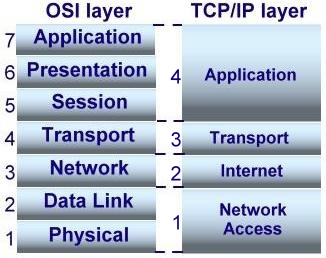
TCP/IP (Transmission Control Protocol/Internet Protocol) is the basic communication language or protocol of the Internet. It can also be used as a communications protocol in a private network (either an intranet or an extranet). When you are set up with direct access to the Internet, your computer is provided with a copy of the TCP/IP program just as every other computer that you may send messages to or get information from also has a copy of TCP/IP.


TCP/IP is a two-layer program. The higher layer, Transmission Control Protocol, manages the assembling of a message or file into smaller packets that are transmitted over the Internet and received by a TCP layer that reassembles the packets into the original message. The lower layer, Internet Protocol, handles the address part of each packet so that it gets to the right destination. Each gateway computer on the network checks this address to see where to forward the message. Even though some packets from the same message are routed differently than others, they'll be reassembled at the destination.

TCP/IP uses the client/server model of communication in which a computer user (a client) requests and is provided a service (such as sending a Web page) by another computer (a server) in the network. TCP/IP communication is primarily point-to-point, meaning each communication is from one point (or host computer) in the network to another point or host computer. TCP/IP and the higher-level applications that use it are collectively said to be "stateless" because each client request is considered a new request unrelated to any previous one (unlike ordinary phone conversations that require a dedicated connection for the call duration). Being stateless frees network paths so that everyone can use them continuously. (Note that the TCP layer itself is not stateless as far as any one message is concerned. Its connection remains in place until all packets in a message have been received.)

Many Internet users are familiar with the even higher layer application protocols that use TCP/IP to get to the Internet. These include the World Wide Web's Hypertext Transfer Protocol (HTTP), the File Transfer Protocol (FTP), Telnet (Telnet) which lets you logon to remote computers, and the Simple Mail Transfer Protocol (SMTP). These and other protocols are often packaged together with TCP/IP as a "suite."

Personal computer users with an analog phone modem connection to the Internet usually get to the Internet through the Serial Line Internet Protocol (SLIP) or the Point-to-Point Protocol (PPP). These protocols encapsulate the IP packets so that they can be sent over the dial-up phone connection to an access provider's modem.

Protocols related to TCP/IP include the User Datagram Protocol (UDP), which is used instead of TCP for special purposes. Other protocols are used by network host computers for exchanging router information. These include the Internet Control Message Protocol (ICMP), the Interior Gateway Protocol (IGP), the Exterior Gateway Protocol (EGP), and the Border Gateway Protocol (BGP).

Sabtu, 01 Februari 2014

11.4 Practical examples (MATH)


Here are some real-life examples of uses of percentages.
  • if you buy something and sell it, the difference between the two price is a profit or a loss. It is given as a percentage of the buying price. If you buy something for $20 and sell it for $15 you make a loss of $5 or 25%
  • When you buy something you may be offered a discount. This is a reduction in the price. It is usually given as a percentage. If the price is normally $20 and you get a 10% discount, you only pay $18.
  • If a bank helps you to buy an item, you may have to pay back more than you borrow. This is the interest that the bank charges. It is given as a percentage of the cost. If a car costs $20 000 and the rate  of interest is 3%, you will pay $20 600.
  • If you buy something the price may include a tax.This is called a purchase tax. When you earn money you may have to pay tax on what you earn. This is called income tax.


Work this out:
  • A women bought a old chair for $240. She sold it for $300. Work our the percentage profit.
  • A bottle of grape juice costs $6.50. If you buy six bottles you can get 10% discount. Work out how much you save if you buy six bottles.

You may check this website if you still didn't understand: 


11.3 Percentage change (MATH)


You can use percentages to describe a change in a quantity. It could be an increase or a decrease
A percentage change in always calculated a percentage of the initial value. 
The initial value is 100%. It is important to choose the correct value to be 100%.


Work this out:
  • These are the masses of three children one April.
         Luke 6kg        Bridget 14kg        Tomas 25kg
         over a year, the mass of each of them increased by 10%. Work out the new mass of each children.

  • "The price after the sale is $20 000 again"
      The price a car was $20 000. In a sale, the price decreased by 4%%.After the sale it increased by 4%.
      a. What mistake has Ahmad made?
      b. What is the correct price after the sale?

You may check this website if you still didn't understand: 

11.2 Comparing different quantities(MATH)


You will often need to compare groups that are different sizes. 
Suppose that, in one school, 85 students took an exam and 59 passed. 
In other school,237 students took an exam and 147 passed. 
Which school did better? It is hard to say because each school had a different number of students. 
The worked example shows how to use percentages to help to answer questions like this.


Work this out: 
  • There are 425 girls and 381 boys in a school. 31 girls and 48 boys are overweight.
          a. work out the percentage of the girls that are overweight.
          b. work out the percentage of the boys that are overweight.
  • This table shows the result of a survey in a factory.
         a. What percentage of men smokers?
         b. Compare the percentage of men and women who are                  non-smoker.


You may check this website if you still didn't understand:

11.1 Using Mental Methods (MATH)


Some percentages are easy to find because they are simple fractions.
There are examples of these on the first page of this unit.
You can use the easy ones to work out more complicated percentages.
You can often do this quite easily. You do not always need a calculator.

Examples :
  • Question :

            There are 4600 people in a sodium. 58% are males. How many is that?
         Answer: 
            100% = 4600
            58% = 50% + 10% + 2%
            50 % = 2300
            10 % = 460
            1% = 46
            58% = 2300 + 460 - (2 x 46) = 2668

  • Question:
            Work Out :  a. 35% of 84      b. 49% of 230
          Answer:
            a. 100% = 84
                35% = 10% + 10% + 10% + 5%
                10% = 8.4
                5% = 4.2
                35% = (8.4 x 3) + 4.2 = 29.4
           b. 100% = 230
               49% = 10% + 10% + 10% + 10% + 5% + 4%
               10% = 4.9
               5% = 24.5
               1% = 0.49
               49% = (4.9 x 4) + 24.5 + (0.49 x 4) = 


Work this out :

  • Question:


use this fact to find : a. 52% of $78          


You may check this website if you still didn't understand:
http://www.homeschoolmath.net/teaching/percent/percent_of_number_mental_math.php